





In this lesson, we are going to discuss the fundamental concepts of Database Management Systems (DBMS) and their essential role in storing, organizing, and managing data in modern information systems. We will examine the definition of a DBMS, explore its key characteristics, and understand how it enables efficient, secure, and reliable data management. The lesson will also introduce the different types of DBMS users and their respective roles in designing, maintaining, and utilizing database systems. By the end of this lesson, students will have a solid understanding of the importance of DBMS as the foundation of today’s data-driven applications and organizations.
Introduction
In the previous lesson, we learned about data, information, and the importance of organizing data in today’s digital world. We also discussed the challenges of traditional methods of storing information and how databases emerged as a better solution for managing large amounts of data.
However, simply having a database is not enough. Organizations need a reliable software system that can create, organize, update, retrieve, secure, and manage databases efficiently. This software is known as a Database Management System (DBMS).
Today, almost every modern application relies on a DBMS. Whether using social media platforms, banking applications, hospital systems, online shopping websites, or school management systems, a DBMS works behind the scenes to ensure that data is stored accurately, retrieved quickly, and protected from unauthorized access.
This lesson introduces the fundamental concepts of Database Management Systems, their characteristics, and the different users who interact with them.
Learning Objectives
At the end of this lesson, students should be able to:
- Explain the concept of a Database Management System (DBMS).
- Define a DBMS using various perspectives.
- Describe the major characteristics of a DBMS.
- Identify the different types of DBMS users and their responsibilities.
- Recognize the importance of DBMS in modern information systems.
Overview of Database Management Systems (DBMS)
Modern organizations generate enormous amounts of data every day. Schools manage enrollment records and grades, hospitals maintain patient information, banks process millions of financial transactions, and businesses track sales and inventory.
Managing this volume of information manually would be inefficient and prone to errors. Even storing data in spreadsheets becomes difficult as organizations grow because spreadsheets lack advanced features for handling large-scale data, security, concurrent access, and relationships between data.
To address these challenges, organizations use a Database Management System (DBMS).
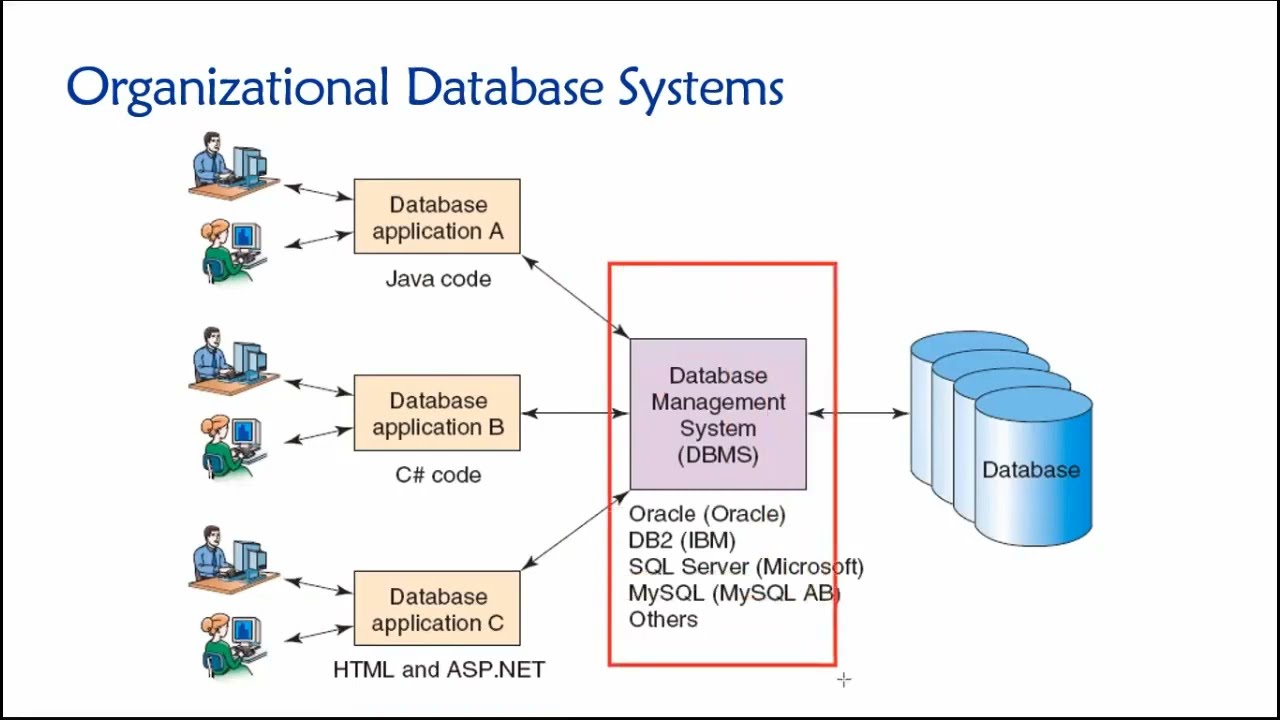
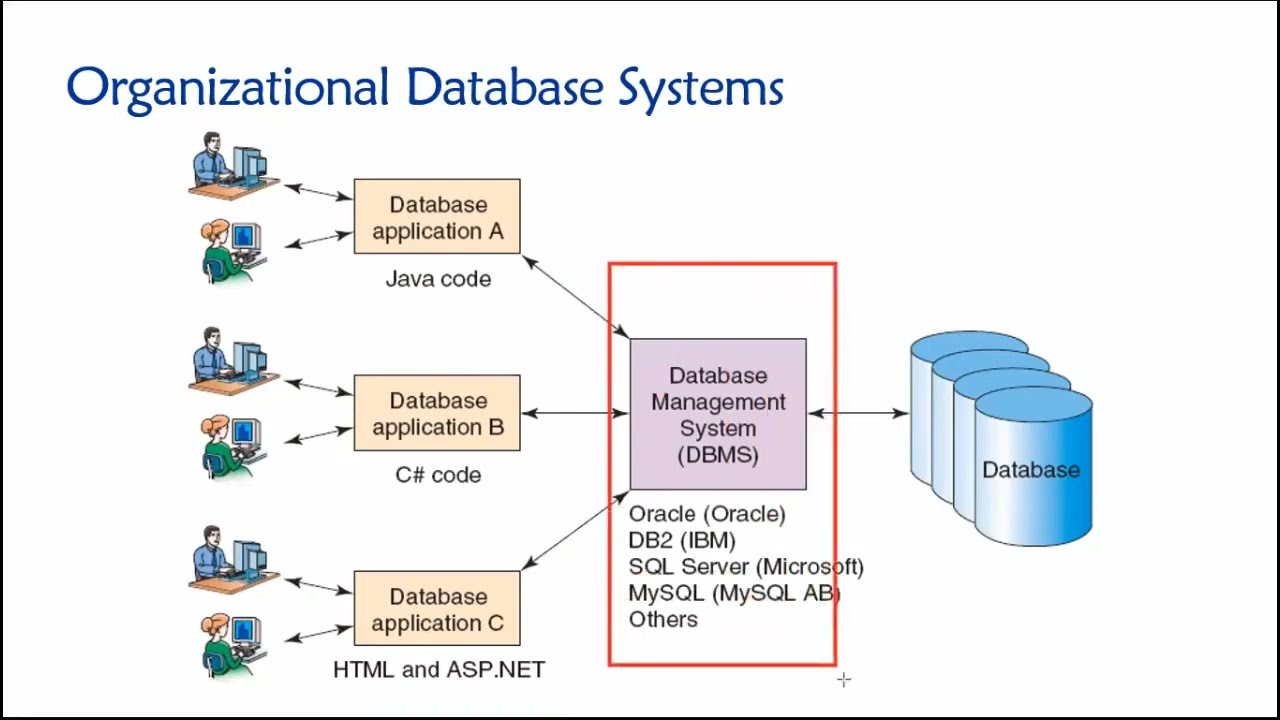
A DBMS is software specifically designed to create, organize, store, retrieve, update, and manage data within a database. It acts as an intermediary between users or application programs and the database itself.
Rather than allowing users to directly manipulate database files, a DBMS provides a structured and controlled environment where all database operations are performed safely and efficiently.
How a DBMS Works
A simple interaction with a database follows this process:
User/Application → DBMS → Database → DBMS → User/Application
For example, when a student logs into the school’s Learning Management System (LMS):
- The student enters a username and password.
- The LMS sends the request to the DBMS.
- The DBMS searches the student records in the database.
- The DBMS retrieves the matching information.
- The LMS displays the student’s dashboard.
The user never interacts directly with the database. Instead, the DBMS processes every request, ensuring accuracy, consistency, and security.
Why Do We Need a DBMS?
Imagine a university with 15,000 students.
Each student has:
- Personal information
- Subjects enrolled
- Grades
- Attendance records
- Tuition balances
- Class schedules
Without a DBMS, managing this information would be extremely difficult.
A DBMS provides several advantages:
- Centralized storage of data
- Fast retrieval of records
- Easy updating of information
- Better organization of related data
- Improved security
- Reduced duplication of data
- Simultaneous access by multiple users
- Automatic backup and recovery mechanisms
These capabilities make DBMS an essential component of almost every modern information system.
DBMS by Definition
Different experts define a Database Management System in various ways, but they all describe the same fundamental concept.
Definition 1
A Database Management System (DBMS) is software that enables users to define, create, maintain, and control access to a database.
Definition 2
A DBMS is a collection of programs that allows users to store, retrieve, update, and manage data efficiently.
Definition 3
A DBMS is an intermediary software that serves as the bridge between users, application programs, and the database by controlling all database operations.
Simplified Definition
Simply put,
A Database Management System (DBMS) is software that manages databases.
It helps users:
- Store data
- Retrieve data
- Update data
- Delete data
- Secure data
- Organize data
- Share data
without directly manipulating the physical database files.
Examples of Popular DBMS
Many organizations use commercial and open-source DBMS software.
MySQL
- Open-source
- Popular for web applications
- Used in PHP, Laravel, WordPress, and many websites
Microsoft SQL Server
- Developed by Microsoft
- Commonly used in enterprise applications
Oracle Database
- Widely used in large corporations
- Highly scalable and secure
PostgreSQL
- Open-source
- Supports advanced database features
- Frequently used in research and enterprise systems
SQLite
- Lightweight
- Stores the entire database in a single file
- Commonly used in mobile applications
MariaDB
- Community-developed fork of MySQL
- High performance and open-source
Characteristics of a Database Management System
A DBMS possesses several important characteristics that distinguish it from simple file storage systems.
1. Data Sharing
Multiple users can access the same database simultaneously.
Example:
In a school information system:
- The registrar updates enrollment records.
- The cashier checks tuition balances.
- Teachers encode grades.
- Students view their grades online.
All users access the same database at the same time without creating multiple copies of the data.
2. Data Security
A DBMS protects sensitive information from unauthorized access.
Security measures include:
- User authentication
- Password protection
- Access permissions
- Role-based access control
- Data encryption
Example:
Students should not be allowed to edit grades.
Only authorized faculty members can modify grade records.
3. Data Integrity
Data integrity ensures that stored information remains accurate, valid, and consistent.
Example:
A student’s age cannot be negative.
A student ID should be unique.
A course code should exist before students can enroll in it.
The DBMS automatically enforces many of these rules.
4. Data Independence
Applications can continue functioning even if changes are made to how data is physically stored.
For example:
A database administrator may upgrade storage hardware without requiring changes to the school’s enrollment system.
This separation between applications and storage makes systems easier to maintain.
5. Reduced Data Redundancy
The DBMS minimizes duplicate copies of the same information.
Example:
Instead of storing a student’s address in multiple files, the address is stored once and referenced whenever needed.
Benefits include:
- Less storage space
- Easier updates
- Improved consistency
6. Backup and Recovery
Modern DBMS software includes mechanisms for protecting data against accidental loss.
Recovery may be necessary because of:
- Hardware failure
- Power interruption
- Software errors
- Human mistakes
Regular backups allow organizations to restore lost information.
7. Concurrent Access
Many users can access the same database simultaneously without corrupting the data.
Example:
During online enrollment, thousands of students may register at the same time.
The DBMS coordinates these operations to ensure accuracy.
8. Data Consistency
A DBMS ensures that every user sees consistent information.
Example:
If a student’s address is updated, every department immediately sees the updated address.
There are no conflicting versions of the same information.
9. Efficient Data Retrieval
DBMS software can quickly search and retrieve information from very large databases.
Example:
Searching for one student’s grades among 20,000 students takes only a few seconds.
10. Scalability
A DBMS can support databases that grow from a few hundred records to millions or even billions of records.
Examples include:
- Amazon
- Banking systems
These systems rely on highly scalable database management systems.
DBMS Users
Many people interact with a database, but each has different responsibilities.
1. Database Administrator (DBA)
The Database Administrator is responsible for managing the entire database system.
Responsibilities include:
- Installing the DBMS
- Creating databases
- Managing users
- Assigning permissions
- Monitoring performance
- Performing backups
- Recovering lost data
- Maintaining database security
The DBA ensures that the database operates efficiently and securely.
2. Database Designer
A Database Designer plans how data will be organized before the database is created.
Responsibilities include:
- Identifying required data
- Designing tables
- Defining relationships
- Establishing constraints
- Creating the database structure
Database Designers focus on creating efficient and well-organized databases.
3. Application Programmers (Developers)
Programmers develop software applications that interact with the database.
Examples include:
- Mobile applications
- Websites
- Inventory systems
- Banking applications
- Student Information Systems
They write programs that send requests to the DBMS for storing, updating, retrieving, and deleting data.
4. End Users
End users are the people who use database applications without directly interacting with the DBMS.
Examples:
- Students
- Teachers
- Customers
- Bank clients
- Cashiers
- Patients
End users simply use the application while the DBMS performs database operations in the background.
5. System Analysts
System Analysts study organizational requirements and determine how database systems should support business processes.
Responsibilities include:
- Gathering user requirements
- Analyzing workflows
- Designing information systems
- Coordinating between users and developers
They ensure that the database system meets organizational needs.
Real-Life Example of DBMS Users
Consider a university enrollment system.
| User | Responsibility |
|---|---|
| Database Administrator | Maintains the database server and security |
| Database Designer | Designs the student database structure |
| Programmer | Develops the enrollment application |
| Registrar | Uses the application to encode student records |
| Student | Views grades and enrollment information through the portal |
Each user performs a different role, but they all rely on the same Database Management System.
Importance of DBMS in Everyday Life
Database Management Systems have become an essential part of modern society. Almost every digital service relies on a DBMS to organize and manage information efficiently.
Examples include:
- Learning Management Systems (LMS)
- Banking systems
- Hospital Information Systems
- Airline reservation systems
- Hotel booking systems
- Online shopping platforms
- Government record systems
- Social media applications
- Food delivery services
- Library management systems
Without a DBMS, these systems would struggle to store large volumes of data, process user requests efficiently, or maintain data accuracy and security.
Lesson Summary
A Database Management System (DBMS) is software that enables users and applications to create, manage, retrieve, update, and secure databases efficiently. It acts as the intermediary between users and the database, ensuring that all data operations are performed safely and accurately. The key characteristics of a DBMS include data sharing, security, integrity, reduced redundancy, backup and recovery, concurrent access, consistency, efficient retrieval, and scalability. Different users—including Database Administrators, Database Designers, Application Programmers, System Analysts, and End Users—work together to ensure that database systems effectively support the needs of modern organizations.
