




In this lesson, we are going to discuss the fundamental concepts of modern web development and how web applications function in today’s digital world. We will explore the roles of the front-end, back-end, and database, and examine how these components work together to deliver dynamic and interactive user experiences. The lesson will also cover the evolution of web technologies and the challenges developers face when building large-scale web applications. By the end of this lesson, students will understand the importance of modern development tools and be prepared to learn how React simplifies the creation of responsive and maintainable user interfaces.
Introduction
Every day, millions of people use web applications such as Facebook, YouTube, Shopee, Lazada, Netflix, and Google. These applications allow users to interact with content, communicate with others, make purchases, watch videos, and perform various online activities. Behind every web application is a collection of technologies working together to provide a smooth and interactive user experience.
Before learning React, it is important to understand how modern web applications work and why technologies such as React were created. This lesson introduces the fundamental concepts of web development, including the structure of web applications, the roles of front-end and back-end development, and the evolution of web technologies.
What is a Website?
A website is a collection of related web pages accessible through the Internet using a web browser such as Google Chrome, Mozilla Firefox, Microsoft Edge, or Safari.
Examples of websites include:
• Google
• Facebook
• YouTube
• Wikipedia
• Amazon
Websites can either be static or dynamic.
Static Website
A static website displays the same content to every visitor. The information remains unchanged unless a developer manually updates the website files.
Examples:
• Personal portfolio websites
• Company profile websites
• Informational landing pages
Characteristics:
• Fast loading
• Simple structure
• Limited user interaction
Dynamic Website
A dynamic website changes its content based on user interaction, stored data, or real-time updates.
Examples:
• Facebook
• Shopee
• Gmail
• Netflix
Characteristics:
• Interactive
• Data-driven
• Personalized content
• Requires communication with databases and servers
How the Web Works
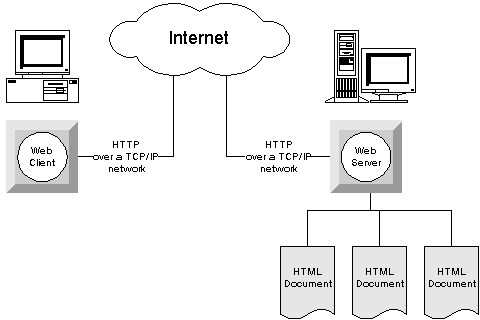
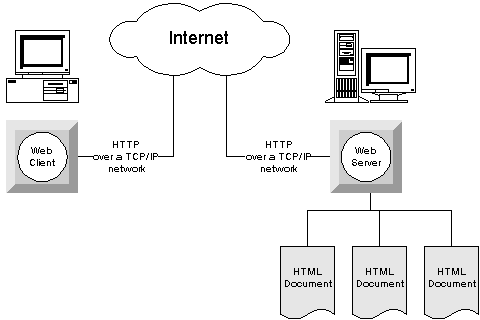
Whenever a user visits a website, several processes occur behind the scenes.
Consider the example of opening Facebook in a browser.
Step 1: User Sends a Request
The user enters the website address into a browser.
Example:
The browser sends a request through the Internet to Facebook’s server.
Step 2: Server Receives the Request
The server receives the request and determines what information is needed.
For example:
• User profile information
• News feed posts
• Friend requests
• Messages
Step 3: Database Provides Data
The server retrieves the necessary information from a database.
The database stores information such as:
• User accounts
• Passwords
• Posts
• Comments
• Images
• Videos
Step 4: Server Sends a Response
After gathering the required information, the server sends a response back to the browser.
Step 5: Browser Displays the Website
The browser interprets the received data and displays the web page to the user.
This entire process typically takes only a few seconds or even milliseconds.
Components of a Modern Web Application
Modern web applications are generally composed of three major parts:
- Front-end
- Back-end
- Database
These components work together to create a complete system.
Front-End Development
The front-end is the visible part of a web application that users directly interact with.
Everything users see on their screens belongs to the front-end.
Examples:
• Buttons
• Images
• Navigation menus
• Forms
• Product listings
• Shopping carts
The primary technologies used in front-end development are:
HTML
HTML stands for HyperText Markup Language.
HTML provides the structure of a web page.
Example:
A webpage title, paragraph, image, and button are all defined using HTML.
CSS
CSS stands for Cascading Style Sheets.
CSS controls the appearance of a web page.
Examples:
• Colors
• Fonts
• Layouts
• Spacing
• Animations
JavaScript
JavaScript adds functionality and interactivity to websites.
Examples:
• Form validation
• Interactive menus
• Pop-up windows
• Dynamic content updates
Together, HTML, CSS, and JavaScript form the foundation of modern front-end development.
Back-End Development
The back-end is responsible for processing data and business logic behind the scenes.
Users cannot directly see the back-end, but they constantly interact with it.
Examples of back-end tasks include:
• User authentication
• Processing orders
• Managing inventory
• Sending emails
• Handling payments
Popular back-end technologies include:
• PHP
• Node.js
• Python
• Java
• ASP.NET
The back-end acts as the bridge between the front-end and the database.
Databases
A database is a structured collection of information.
Databases store and organize data so that applications can retrieve and update information efficiently.
Examples of stored data include:
• User accounts
• Product information
• Customer orders
• Student records
• Transaction histories
Popular database systems include:
• MySQL
• PostgreSQL
• MongoDB
• SQL Server
Without databases, modern applications would not be able to remember user information or store records.
The Evolution of Web Development
Web development has evolved significantly over the years.
Understanding this evolution helps explain why React became necessary.
Web 1.0
The first generation of websites consisted mostly of static pages.
Characteristics:
• Read-only content
• Limited interaction
• Simple design
Technologies used:
• HTML
• Basic CSS
Examples:
• Online brochures
• Basic informational websites
Web 2.0
Websites became interactive and user-centered.
Characteristics:
• User-generated content
• Real-time updates
• Dynamic interfaces
Examples:
• Facebook
• YouTube
• Twitter
• Instagram
Technologies used:
• HTML
• CSS
• JavaScript
• Databases
This era introduced highly interactive web applications.
The Growing Complexity of Web Applications
As web applications became larger and more complex, developers encountered several challenges.
Imagine building Facebook using only HTML, CSS, and JavaScript.
The application would contain:
• Thousands of pages
• Thousands of buttons
• Millions of users
• Continuous updates
Managing such an application becomes increasingly difficult.
Common problems include:
Code Duplication
Developers repeatedly write similar code.
Difficult Maintenance
Changing one feature may require editing multiple files.
Reduced Productivity
Developers spend more time fixing issues than creating features.
Scalability Issues
Applications become difficult to expand and maintain.
These challenges motivated the creation of frameworks and libraries.
What are Frameworks and Libraries?
Frameworks and libraries are collections of pre-written code designed to simplify software development.
They provide reusable tools, functions, and structures that help developers build applications more efficiently.
Examples include:
• React
• Angular
• Vue
• Bootstrap
• jQuery
Rather than building everything from scratch, developers can use these tools to speed up development and improve maintainability.
Why React Was Created
React was developed by Facebook to address the challenges of building large-scale user interfaces.
As Facebook continued to grow, developers needed a better way to manage complex and constantly changing interfaces.
React introduced a new approach called Component-Based Development.
Component-Based Development
A component is a reusable piece of a user interface.
Examples of components include:
• Navigation Bar
• Login Form
• Product Card
• Footer
• Search Box
Instead of building an entire webpage as one large file, developers divide the interface into smaller reusable components.
Benefits include:
Reusability
Create once and use multiple times.
Maintainability
Updates can be made in a single location.
Better Organization
Code becomes easier to understand and manage.
Team Collaboration
Different developers can work on separate components simultaneously.
Modern Web Development Architecture
Today, many web applications follow a client-server architecture.
In this setup:
Front-End (React)
↓
API
↓
Back-End (PHP, Node.js, Laravel)
↓
Database (MySQL)
React is responsible for presenting information to users and handling user interactions.
The back-end processes requests and communicates with the database.
The database stores and manages application data.
Together, these technologies create complete and scalable web applications.
Preparing for React
Understanding modern web development fundamentals is essential before learning React.
React is not a programming language.
React is a JavaScript library designed to simplify the development of modern user interfaces.
It helps developers build fast, interactive, maintainable, and scalable web applications using reusable components.
In the succeeding lessons, students will learn how React works, why it has become one of the most popular front-end technologies, and how it can be used to build professional web applications.
Introduction to Developer Tools and the Modern Web Development Environment
Overview
Modern web development involves more than just writing HTML, CSS, and JavaScript. Developers use a variety of tools to write code efficiently, test applications, manage project files, collaborate with team members, and deploy applications to production environments. Understanding these tools is essential because they form the foundation of professional software development.
Before students begin creating React applications, they should first become familiar with the development tools that will be used throughout the course and in real-world development projects.
Visual Studio Code (VS Code)
Visual Studio Code, commonly known as VS Code, is one of the most widely used source code editors in the software development industry. It provides developers with a powerful environment for writing, editing, and organizing code.
Features of VS Code
• Syntax Highlighting
• Auto-completion (IntelliSense)
• Code Formatting
• Integrated Terminal
• Debugging Tools
• Extension Support
These features help developers write code faster and reduce errors.
Example Scenario
Imagine a developer is creating an online food ordering system.
The project contains:
• Homepage
• Product Page
• Shopping Cart
• User Profile
• Order History
Instead of managing dozens of files manually, VS Code organizes everything in a single workspace, allowing the developer to navigate the project efficiently.
Real-World Use Case
A React project may contain:
src/
 ├── components/
 ├── pages/
 ├── services/
 ├── assets/
 └── App.js
VS Code makes it easier to manage these folders and files, especially as projects become larger.
Web Browsers and Developer Tools
Web browsers are not only used to view websites but also to inspect and debug web applications.
Popular browsers include:
• Google Chrome
• Mozilla Firefox
• Microsoft Edge
Most professional developers use browser Developer Tools (DevTools) during development.
What Can Developer Tools Do?
Developers can:
• Inspect HTML elements
• View CSS styles
• Test responsive layouts
• Monitor network requests
• Debug JavaScript code
• Analyze performance
Example Scenario
Suppose a student creates a webpage and notices that a button is not displaying correctly.
Without Developer Tools:
The student may spend several minutes searching for the problem.
With Developer Tools:
The student can inspect the button, identify the incorrect CSS rule, and fix the issue immediately.
Real-World Use Case
A customer reports that the login button on a website is not working.
A developer opens Chrome DevTools and discovers that a JavaScript error prevents the button from functioning properly.
The issue is quickly identified and fixed.
Node.js
Traditionally, JavaScript only ran inside web browsers.
Node.js changed this by allowing JavaScript to run outside the browser.
This makes it possible to:
• Build servers
• Create APIs
• Run development tools
• Install packages
• Create React applications
Why React Needs Node.js
React applications are not written entirely from scratch.
Developers use tools that automatically:
• Compile code
• Optimize files
• Install libraries
• Start development servers
These tools depend on Node.js.
Example Scenario
A developer wants to create a new React project.
Instead of manually creating every file, the developer runs a command that automatically generates the project structure.
This process is possible because Node.js is installed on the computer.
Real-World Use Case
Companies like Netflix, PayPal, and LinkedIn use Node.js in various parts of their systems because it supports fast and scalable web applications.
npm (Node Package Manager)
npm is a package manager included with Node.js.
It allows developers to install libraries and tools created by other developers.
Why npm is Important
Instead of creating every feature from scratch, developers can install existing packages.
Examples:
• React
• Bootstrap
• Axios
• React Router
Example Scenario
Suppose a developer wants to add page navigation to a React application.
Without npm:
The developer would need to create a routing system manually.
With npm:
The developer installs React Router using a single command and immediately gains access to advanced routing features.
Real-World Use Case
An e-commerce application may use:
• React for UI
• React Router for navigation
• Axios for API requests
• Bootstrap for styling
All these packages are installed and managed through npm.
Git and Version Control
Software projects constantly change.
Developers add new features, fix bugs, and improve existing code.
Without version control, managing these changes becomes difficult.
Git is a version control system that records every modification made to a project.
Benefits of Git
• Tracks code history
• Restores previous versions
• Supports team collaboration
• Prevents accidental data loss
Example Scenario
A student accidentally deletes an important file after several hours of work.
Without Git:
The work may be permanently lost.
With Git:
The student can restore a previous version of the project.
Real-World Use Case
A team of five developers is building a delivery application.
Developer A works on the login page.
Developer B works on the ordering system.
Developer C works on the payment system.
Git allows all developers to work simultaneously without overwriting each other’s changes.
GitHub
GitHub is an online platform that stores Git repositories.
Developers use GitHub to:
• Backup projects
• Share code
• Collaborate with teams
• Track issues
• Deploy applications
Example Scenario
A student’s laptop suddenly becomes damaged.
If the project exists only on the laptop, all files may be lost.
If the project is stored on GitHub, it can easily be downloaded onto another computer.
Real-World Use Case
Open-source projects such as React itself are maintained on GitHub by thousands of contributors around the world.
The Modern Web Development Workflow
Professional developers follow a structured workflow when building applications.
Step 1: Write Code
Use VS Code to create and edit project files.
Step 2: Test the Application
Use a web browser and Developer Tools to test features and identify issues.
Step 3: Install Dependencies
Use npm to install required packages and libraries.
Step 4: Manage Source Code
Use Git to track project changes.
Step 5: Store the Project Online
Use GitHub to back up and share project files.
Step 6: Deploy the Application
Publish the finished application to a hosting platform so users can access it online.
Connection to React Development
As students progress through this course, they will use these tools repeatedly.
For example:
• VS Code will be used to write React code.
• Chrome Developer Tools will be used to inspect React applications.
• Node.js will run the React development environment.
• npm will install React and other libraries.
• Git will track project changes.
• GitHub will store and share project repositories.
Understanding these tools before learning React allows students to focus on React concepts without struggling with the development environment itself. These tools are considered industry standards and are commonly used by professional web developers worldwide.
