





In this lesson, we are going to discuss the architecture of Database Management Systems (DBMS) and examine how databases are organized to efficiently manage and process data. We will explore the different types of data models, understand the purpose of data schemas, and learn how they serve as blueprints for designing database structures. The lesson will also introduce the concept of data independence and explain how it enables changes to the database without disrupting applications or users. By the end of this lesson, students will understand the fundamental principles that make modern database systems flexible, organized, and adaptable to evolving organizational needs.
Introduction
In the previous lesson, we learned that a Database Management System (DBMS) is software that enables users to create, manage, retrieve, update, and secure databases efficiently. We also discussed the characteristics of a DBMS and identified the different users who interact with database systems.
To fully understand how a DBMS functions, it is important to examine how data is organized, represented, and managed internally. Every database follows a specific architecture and structure that enables users and applications to access data efficiently while hiding the complexity of how the data is physically stored.
This lesson introduces the architecture of a Database Management System, explores the different types of data models used to represent information, explains the purpose of data schemas, and discusses the concept of data independence, which is one of the most significant advantages of modern database systems.
Learning Objectives
At the end of this lesson, students should be able to:
- Explain the architecture of a Database Management System.
- Differentiate the three-schema architecture of a DBMS.
- Describe the different types of data models.
- Explain the purpose of data schemas.
- Differentiate logical schema from physical schema.
- Explain the concept and importance of data independence.
- Differentiate logical data independence from physical data independence.
DBMS Architecture
What is DBMS Architecture?
A Database Management System is more than just software that stores data. It is carefully designed with different layers that separate how users interact with data from how the data is physically stored.
DBMS Architecture refers to the overall design or structure of a database system that defines how users, applications, the DBMS software, and the database interact with one another.
A well-designed architecture provides:
- Efficient data processing
- Data security
- Data consistency
- Flexibility
- Scalability
- Easier maintenance
Instead of allowing users to access data files directly, the DBMS serves as an intermediary that processes every request.
Basic DBMS Architecture
A simplified architecture consists of four major components:
Users → Application Programs → DBMS → Database
Users
Users interact with database applications such as:
- Student Information Systems
- Banking applications
- Hospital systems
- Online shopping websites
Users do not directly access the database.
Application Programs
Applications provide the interface between users and the database.
Examples include:
- Mobile apps
- Websites
- Desktop software
- Point-of-sale systems
These applications send requests to the DBMS whenever users perform actions.
Database Management System (DBMS)
The DBMS processes every request made by users or applications.
Its responsibilities include:
- Validating requests
- Retrieving data
- Updating records
- Enforcing security
- Managing concurrent users
- Maintaining data integrity
Database
The database is where all organized data is stored permanently.
Examples include:
- Student records
- Employee information
- Customer accounts
- Product inventories
The database stores data, while the DBMS manages it.
The ANSI/SPARC Three-Schema Architecture
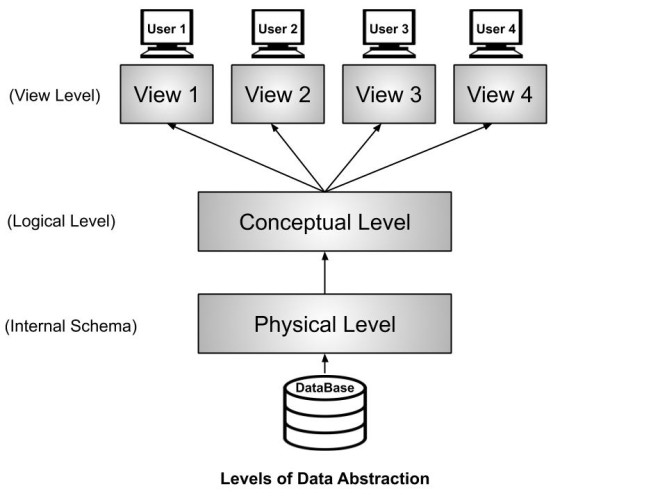
Modern DBMS follows the Three-Schema Architecture, which separates the database into three levels.
This design simplifies database management and provides data independence.
The three levels are:
- External Level
- Conceptual Level
- Internal Level
External Level (View Level)
The External Level is the highest level of the database architecture.
It represents how individual users view the database.
Different users may see different portions of the same database depending on their responsibilities.
Example
Consider a school database.
A student may only see:
- Name
- Subjects
- Grades
- Schedule
A faculty member may see:
- Student grades
- Class lists
The registrar may see:
- Student records
- Enrollment details
- Personal information
Although everyone uses the same database, each user views only the information relevant to them.
This improves security and simplifies database usage.
Conceptual Level (Logical Level)
The Conceptual Level describes the logical structure of the entire database.
It answers questions such as:
- What tables exist?
- What relationships exist?
- What constraints are applied?
- What data should be stored?
At this level, database designers define:
- Entities
- Attributes
- Relationships
- Constraints
This level is independent of physical storage.
Internal Level (Physical Level)
The Internal Level describes how data is physically stored on storage devices.
It includes:
- File organization
- Indexes
- Storage blocks
- Record placement
- Compression
- Access methods
End users never interact with this level directly.
Database Administrators manage this layer.
Data Models
What is a Data Model?
A Data Model is a collection of concepts used to describe how data is organized, stored, related, and manipulated inside a database.
It serves as a blueprint for designing databases.
A data model specifies:
- Data structures
- Relationships
- Constraints
- Operations
Without a data model, designing a database would be difficult and inconsistent.
Types of Data Models
Several data models have been developed throughout the evolution of database systems.
1. Hierarchical Data Model
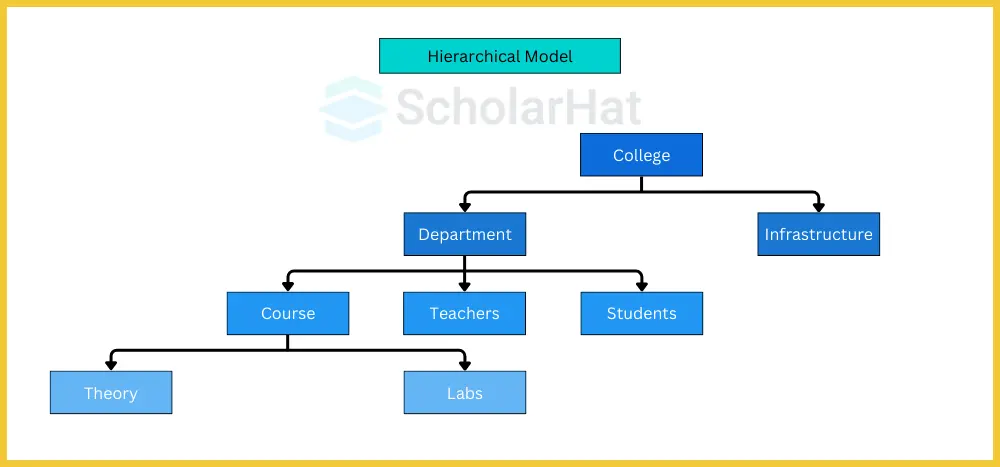
The Hierarchical Model organizes data in a tree-like structure.
Each parent record can have multiple child records.
However, each child can only have one parent.
Example
University
→ College
→ Department
→ Student
Advantages:
- Fast retrieval
- Simple structure
Disadvantages:
- Difficult to modify
- Limited relationships
- Poor flexibility
2. Network Data Model
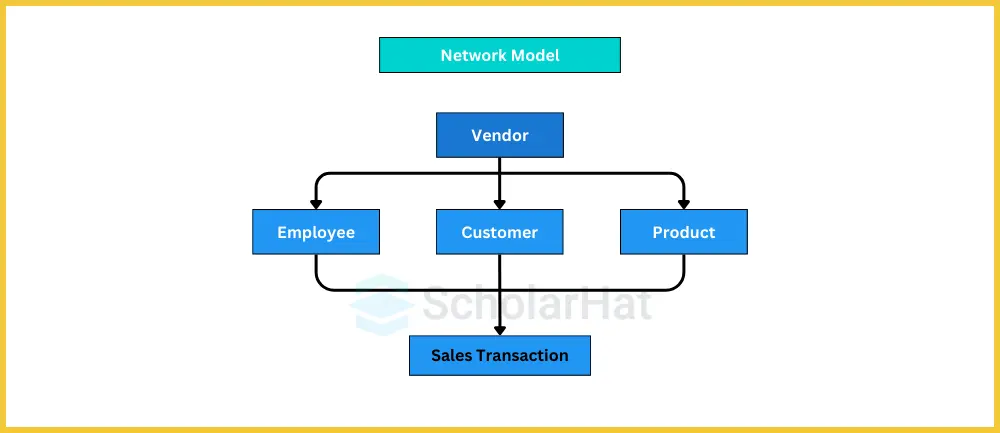
The Network Model expands the hierarchical model.
A child record may have multiple parent records.
This allows more complex relationships.
Example
A student may belong to several organizations while an organization has many students.
Advantages:
- Flexible relationships
- Efficient navigation
Disadvantages:
- Complex implementation
- Difficult maintenance
3. Object-Oriented Data Model
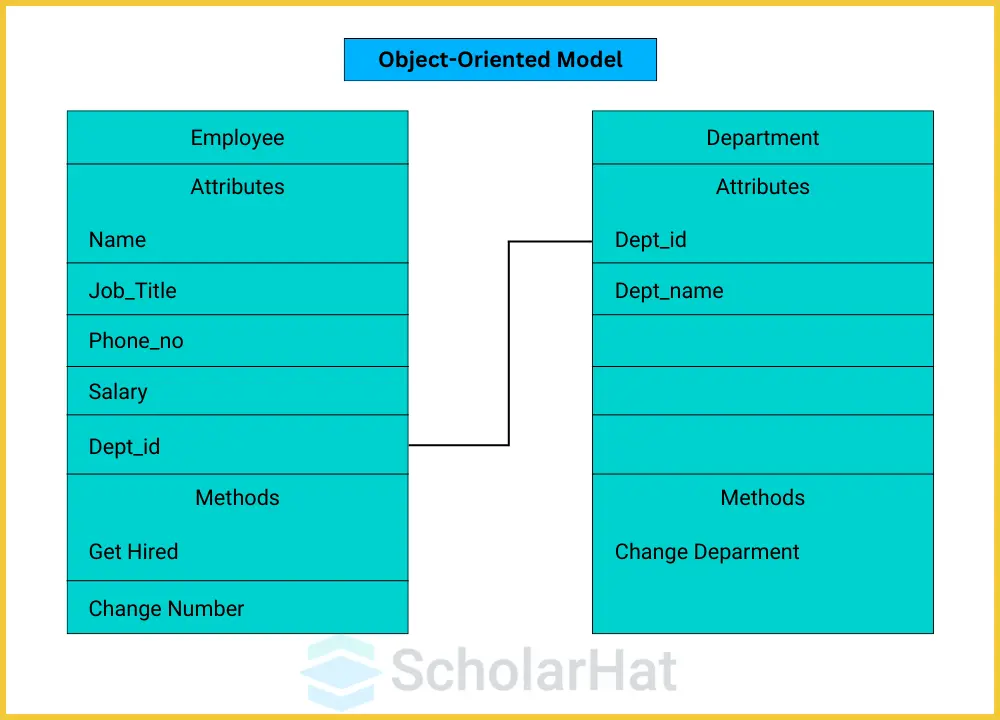
This model combines object-oriented programming concepts with databases.
Data is stored as objects rather than tables.
Objects contain:
- Data
- Methods
- Relationships
This model is useful for:
- Multimedia systems
- Geographic Information Systems
- Engineering applications
4. Relational Data Model
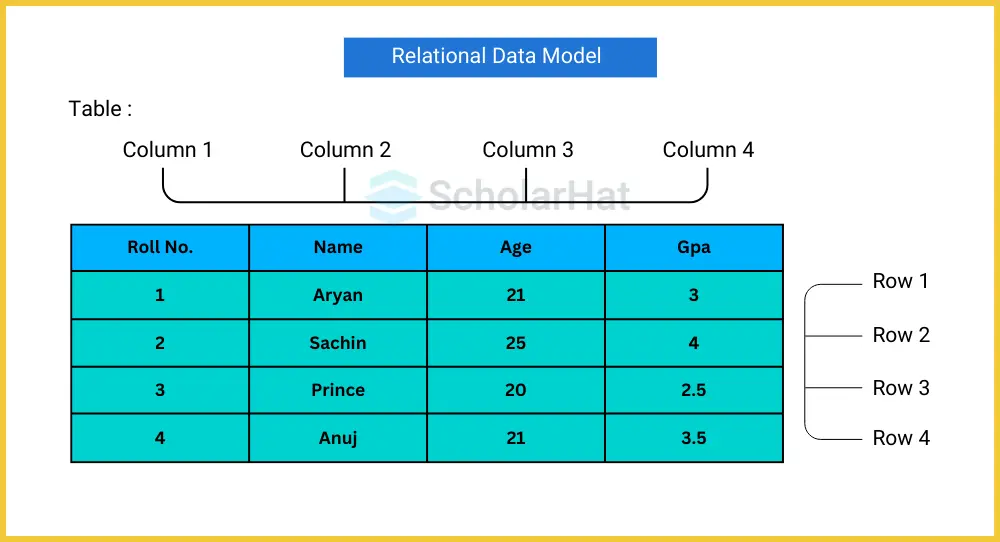
The Relational Model is the most widely used data model today.
It organizes data into tables consisting of rows and columns.
Example
Student Table
| StudentID | Name | Course |
|---|---|---|
| 2026-001 | Juan | BSIT |
Rows represent records.
Columns represent fields.
Relationships between tables are established using keys.
Advantages:
- Simple design
- Easy querying using SQL
- High flexibility
- Strong data integrity
Most modern DBMS such as MySQL, PostgreSQL, Oracle, Microsoft SQL Server, and MariaDB use the relational model.
Data Schemas
What is a Data Schema?
A Data Schema is the overall blueprint or logical design of a database.
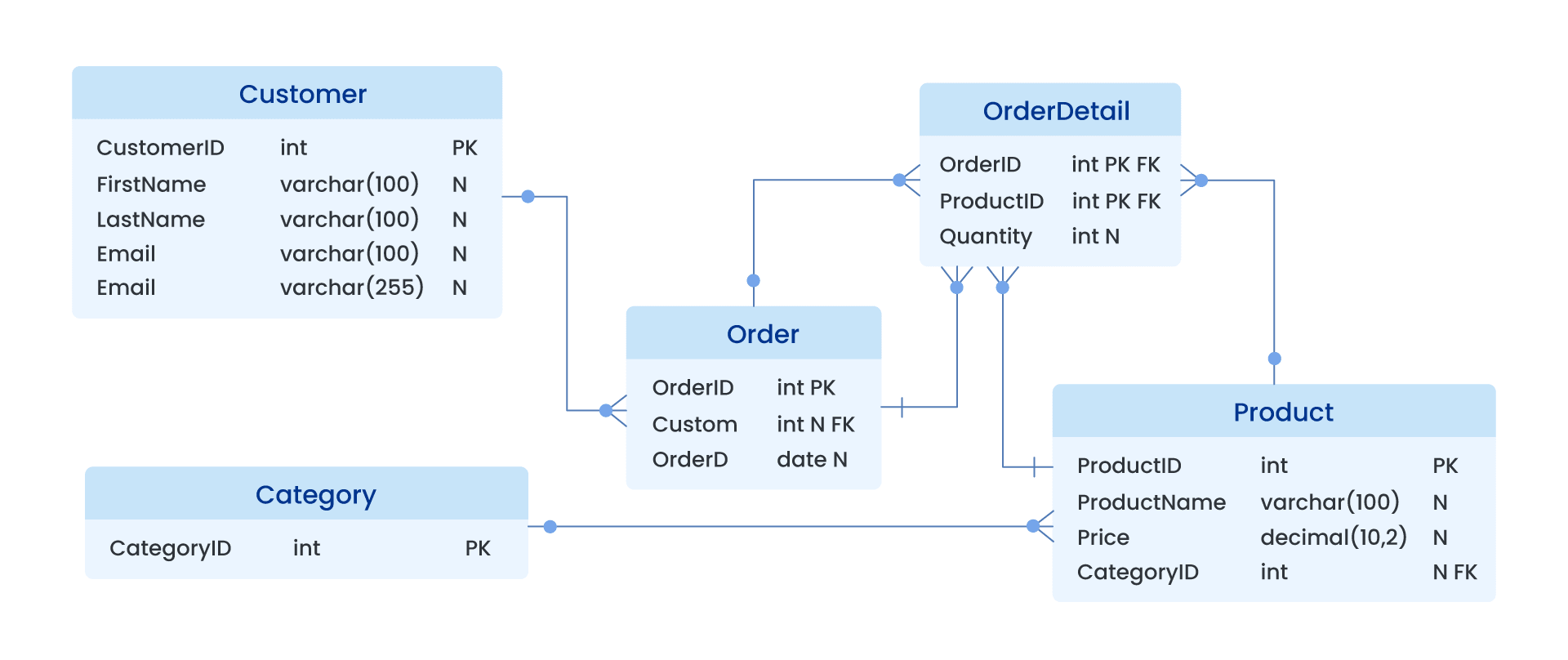
It describes:
- Tables
- Columns
- Data types
- Relationships
- Constraints
- Keys
A schema defines how the database should be organized before any data is stored.
Think of a schema as the architectural plan of a building.
The blueprint does not contain furniture or people—it only describes how the building will be constructed.
Likewise, a database schema describes the structure, not the actual data.
Types of Data Schemas
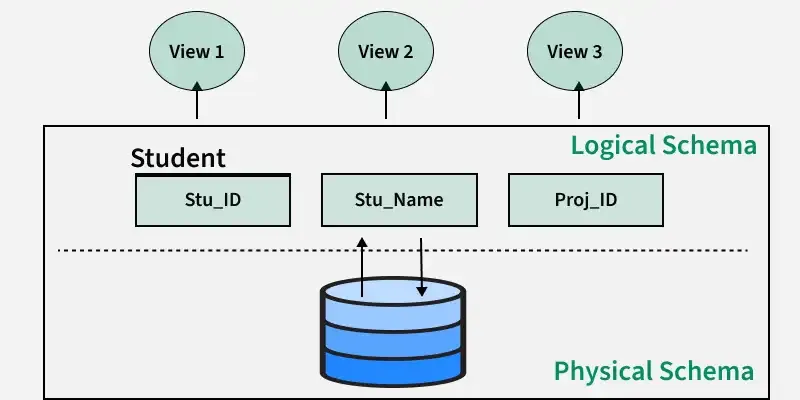
Physical Schema
The Physical Schema describes how data is physically stored.
It includes:
- Storage locations
- File organization
- Indexes
- Access paths
This schema is primarily managed by Database Administrators.
Logical Schema
The Logical Schema describes the logical organization of the database.
It defines:
- Tables
- Columns
- Relationships
- Constraints
Application developers and database designers mainly work with logical schemas.
Example of a Logical Schema
Student Table
| StudentID | INT |
|---|---|
| Name | VARCHAR(100) |
| Course | VARCHAR(50) |
| Age | INT |
The schema defines the structure of the table before any student records are inserted.
Data Independence
What is Data Independence?
One of the greatest advantages of modern DBMS is Data Independence.
Data Independence is the ability to modify one level of the database without significantly affecting other levels.
This allows database systems to evolve without requiring major changes to application programs.
Why is Data Independence Important?
Imagine a university upgrades its database server.
Students should still be able to use the Student Portal without noticing any difference.
Likewise, adding a new column to a table should not require rewriting every application in the university.
Data Independence makes this possible.
Benefits include:
- Easier maintenance
- Lower development costs
- Greater flexibility
- Improved scalability
- Longer system lifespan
Types of Data Independence
Physical Data Independence
Physical Data Independence allows changes to physical storage without affecting the logical design.
Examples:
- Replacing a hard drive
- Creating indexes
- Compressing data
- Changing storage devices
Applications continue to function normally because these changes occur only at the internal level.
Logical Data Independence
Logical Data Independence allows modifications to the logical structure without affecting user views or application programs.
Examples:
- Adding new columns
- Creating new tables
- Splitting existing tables
- Combining tables
For instance, if a university adds an “Email Address” column to the Student table, the existing Student Portal can continue functioning without modification, provided the applications do not depend on the new field.
Logical Data Independence is generally more difficult to achieve than Physical Data Independence because changes to the logical structure may affect applications if not properly designed.
Relationship Among Architecture, Schemas, and Data Independence
These concepts work together to create a flexible and efficient database system.
- DBMS Architecture defines how the database system is organized into different levels.
- Data Schemas describe the structure of the database at each level.
- Data Models provide the framework for representing and organizing data.
- Data Independence allows changes at one level without disrupting the others.
Together, these concepts enable organizations to maintain and improve their databases while ensuring continuous operation and minimal impact on users.
Real-World Example
Consider an online shopping platform.
Customers use a mobile application to browse products and place orders. They only interact with the External Level.
Behind the scenes, the application communicates with the DBMS, which uses the Conceptual Level to understand the relationships between products, customers, and orders.
The Internal Level determines how this information is physically stored on servers.
If the company upgrades its storage hardware or creates additional indexes to improve performance, customers continue using the application without interruption because the DBMS provides physical data independence.
Lesson Summary
DBMS Architecture defines how users, applications, the DBMS, and the database interact, with the ANSI/SPARC Three-Schema Architecture separating the system into External, Conceptual, and Internal levels. Data models provide the framework for organizing and representing data, with the relational model being the most widely used in modern database systems. A data schema serves as the blueprint that defines the structure of a database, including its tables, fields, relationships, and constraints. Data independence enables changes to the physical or logical structure of a database without significantly affecting applications or users, making database systems more flexible, maintainable, and scalable.
— End of Lesson —
